Online Tracking 101

online tracking 101

Whether you like it or not, your Internet activities are being monitored every time you log online. Learn who’s tracking you, what it means for your privacy, and what you can do about it. For more information about ZoneAlarm 2013 products’ features, including Do Not Track, click here.
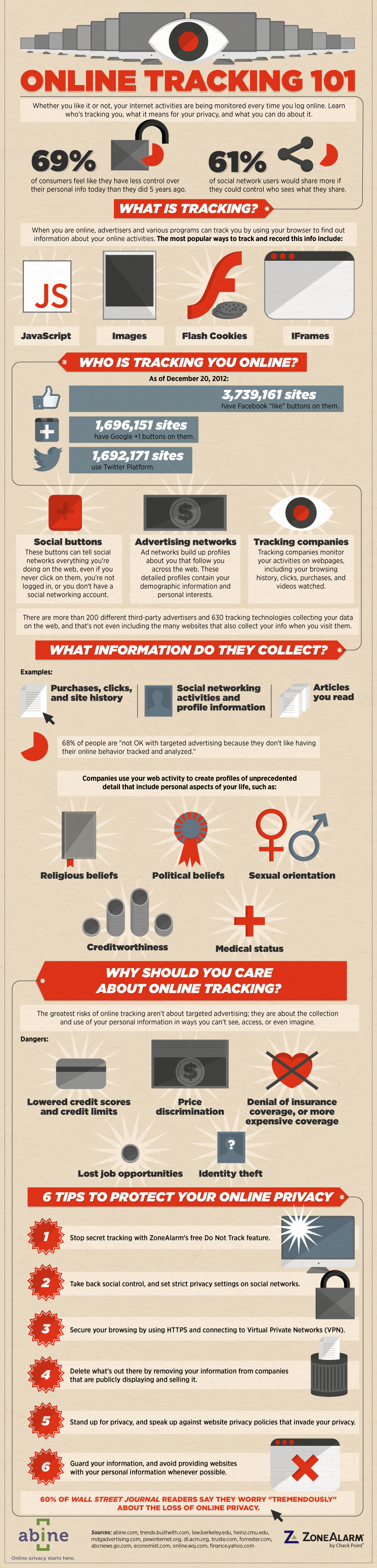
 

(Click below image to enlarge)

EMBED THE IMAGE ABOVE ON YOUR SITE

43 Reader Comments
to “Online Tracking 101”
  1. SHUANNE PITMAN ON

    THIS IS SO TRUE I HAVE EMAILS COMING TO MY IN BOX ALL THE TIME AND I HAVE FOUND THAT THESE EMAILS ARE SPAM SO YES VERY MUCH SO WE ALL NEED TO KEEP OUR PRIVACY SO COME ON GUYS GET SAFE AND GET PROTECTED

  2. Yes I have also a lot of spam in my mailbox!! That’s why I use gmail!

    And you must use a good protection program!
    Even when you use a memory/usb stick or a other device from somebody else you can get a virus/worm or worse!

  3. jeff hatchett ON

    As a college student certified in website design and network security, over the last year of testing designs revealed an dramatic increase in attempts with javascript, java and pipe injections of multiple types, sometimes in parallel fro a single source. This delayed “going live” several times until I started using Zone Alarm Extreme and recommending it to clients. The clients where completely surprise to what was happening on their network and computers from even legimate sites. TAKE THIS 101 EDUCATION SERIOUSLY.

    • Jim Med ON

      jeff hatchett — Why should I take your advice if you can’t even use the correct word “were” instead of “where”. And from a college student, no less!

      • When people post advice for free, they don’t necessarily spell check and audit what they write three times before hitting the submit button, just because someone has a spelling error does not mean I disgard what they say.

        If they were getting paid to do this you might have a point, I would give this person the benefit of the doubt.

        • I am surprised at people’s shortsightedness, just because of a spelling mistake, the person is speaking BS, you are due what ever comes to you

      • jeff hatchett ON

        OK, then DONUT take it.

        • Jeff it is better to take things at face value till proven otherwise, the scales are balanced in favor of advice than at criticizem

          • jeff hatchett ON

            Leeu, well spoken and understood. However, I find that it depends on the audience at hand. What Jim said was bullying and not advice, though your point was to take it as advice for the heirs of “peace of mind”. I get it. I will not be bullied by anyone and not make a sound when it happens, my fights are usually my own. That feeds their ego to do it to others. I appreciate the fact that you guys (steve and yourself) called Jim out on this, but I had no idea anyone would. Thanks for giving me/us faith in human dignity again.

      • Jim Med-WHERE DID YOU GO TO COLLEGE? I counted 6 errors in the post by jeff hatchett while you seem to have noticed only one. And by making that “one” error, the entire post seems worthless to you. It appears that you are an INCOMPETENT CRITIC!

        Jeff, thanks for your taking the time to try and help us, errors and all!

  4. Edohiguma ON

    Then don’t plaster your personal info all across the web, duh. If you google my name you will only find people with the same name, but not me. Simple as that.

    • Andy VonSchweal ON

      Same here. I looked up my name but only found one other guy who lives in Colorado, but I’m mostly silent. You could probably find me on just FB but other than that, nowhere else. In fact, my online alias is found more than my actual name! Haha.

      • Try googling your email address…. You will be surprised.

        • I just Google’d my email addy and the results were astounding. I had two full web pages that listed the word “Chris” within the email addy for Gmail….wow!

          David, could it be that you haven’t been as discreet with your email addy as you think and that’s why it pulls up in a Google search?

          Jeff Hatchett,
          Thanks for posting your FREE info.
          It’s a sad world that we live in when people try to point out the flaws in something that they’re receiving for FREE (if they don’t want it, then don’t take it. It couldn’t be any more simple). It usually points to that person having their own issues that they are refusing to, or unable to deal with. smh

  5. This info is so good I’m going to Like it on Facebook, Digg it and Tweet about it; just like the scrolling graphic encourages me to do!

  6. Geekasaurus ON

    I use Firefox with Ghostery and Adblock and go through a proxy server when possible. You can have Firefox erase cookies after you close it and it also has a do not track feature. Ghostery shows you what a frightening amount of places are trying to track you but you can block them with this add on . Oh and I don’t have Facebook or Twitter either. I have seen how ads “stalk” people on different websites when they use IE after doing a search on Amazon for example.

  7. e-babes ON

    I agree, use a proxy, ad block and no script and others and don’t post anything on the internet you don’t want your own mother to see.

    Search for me on FB and all you get is my alias too…however I’m certain there is more I can do

  8. Sounds like a wise move.

    Now if someone would please tell us where the feature can be turned on?

    Thank you for your time.

    • zonealarm ON

      You can get our ZoneAlarm Do Not Track feature when you install our current any of our current ZoneAlarm products AND opt in to our security toolbar.

    • In Firefox, go to “Tools”, “Options”, “Privacy”. The tick-box should be at the top left-hand corner of the window.

      • Wrong. This is completely VOLUNTARY. Hence, it does not work. I mean that the companies must be willing to allow you your privacy. Fat chance of that, my friend.

  9. Jennifer ON

    The link to more information about Do Not Track just takes me to a blank white screen?

  10. Justin Denial ON

    Windows XP, SP2, and an attempted upgrade to ZA 2013. Got a blue screen with – Internal_Kernel_Handle error 0×00000093 Twice!. Yes I tried it again. Took a day to find out how to manually remove ZA. In Safe Mode, had 0 ability to backup data to DVD drive. Thought I was hosed. be Careful out there.

    • zonealarm ON

      Please be as specific as possible. We have several ZoneAlarm products, so just saying you upgrade to ZoneAlarm 2013 does not help us to determine what might have cause your issue. You can send us a message privately on our Facebook page, as that will be the easier way to respond. http://www.facebook.com/zonealarmfirewall.

  11. smilendragon ON

    you can simply boot Linux from your cd drive and access the the internet using the disc as you operating system…When you pull the disc you simply disappear……

    • Really? Have you heard of electronic footprints? Your info will still be tracked my friend! Don’t be so naive! Take precautions to stop tracking alltogether! And use Zone Alarm Firewall of course!

      • jeff hatchett ON

        Nui, smilendragon is unfortunately right because the footprints will lead to the “unsuspecting” friend/family that let him/her use their computer to do this. I can be done with a crashed computer too at a street cost of 10 to 50 dollars to do just that then throw it away or resale to another unsuspecting friend/family. I DO NOT SUPPORT THESE METHODS but trying to keep you on the real so this does not ever happen to you. Don’t let others near your computer unless you trust them enough to marry them, if you know what I mean.

  12. Silverbullet ON

    What about info that is already posted on an individual? Does this give you the ability to remove those too? Im a good guy, nothing bad about me at all, just been a high profile person all my life and want some peace and quiet now.

    • jeff hatchett ON

      To my knowledge NO. Even those that have the resources to hire very good lawyers are having a hard time doing that. Zone Alarm ID Guard is a step in the right direction.

  13. Bluewater ON

    I do not use Google as a search engine, I use Ixquick instead. It lets the user surf the net anonymously; no history, no cookies etc.

  14. That’s exactly why i use the Ghostery extension in my Chrome browser (but it works with FFox, Safari, IE, Comodo, etc)! It’s FREE and it will block EVERY tracker, adware, analytics, beacon & etc on the web! Also no more ads, pop-ups & other annoyances If you want you can easily disable it by right-clicking it’s icon… I use Zone Alarm Free Firewall which is great by the way so you don’t have to pay for good software thanks to these companies that have free versions for those of us that simply don’t have enough money & struggle to fight to the end of the month! Thanks for that Zone Alarm! I’ve recommended your Firewall to all my friends, family & persons that i get to know if they talk about Web security I’ve also recommended your product in FB, Twitter & many many other sites! I consider it to be the Best Firewall in the World A real #1 winner!

    • jeff hatchett ON

      Do you have to be real technical to use Ghostery Nui? It sounds like a solution that the low income people I know might be interested in.

      • John ON

        Jeff, it is some weeks since your posting, so perhaps you have given up hope of a response?

        However, if not, and for other latecomers to this article, I have Ghostery installed in Firefox, Opera, Google Chrome, and SRWare Iron [Chrome clone minus much of Google's privacy violating tricks].

        Everything is automated, and, on installation, the user is taken through a configuration procedure:

        – Whether to share “anonymous statistical data” with “Ghostery HQ”.
        – Whether to automatically update Ghostery’s tracker database.
        – Whether or not to enable the blocking of all or some of five categories of trackers.

        My SRWare Iron installation reports that it is blocking 1249 out of 1363 trackers. Two trackers I need in order to use the comments and feedback options on a couple of sites, the other 1,012 trackers seem to be a default whitelisting which I will need to investigate. Ghostery helps here with links to details on the companies involved.

        Ghostery on Google Chrome reports that it is blocking 1035 out of 1363 trackers! More work to do!

        Collusion is an extension which creates a pretty graphical representation of websites, visited and not visited, and which report to which. “Visualize and, optionally, block the invisible websites that track you.”

        The extension is available for both Firefox and Chrome/SRWare Iron; however, Collusion for Chrome provides a coloured graph, whereas the Firefox extension only does white blobs on a black field. Both versions offer limited data on the websites showing in the graphs.

        It is interesting to have Ghostery and Collusion running together, and see which blocks more or less than the other. Then I have Adblock Plus as well. That blocks trackers as well as those adverts which infest webpages and get between the text/images and the hapless surfer who has to peer through the bandwidth consuming clutter.

        Try writing webpages to disk without Adblock Plus, and then load those pages from the disk file! Compare with the version downloaded directly from the source server.

        Consider also:
        What’s in an Ad: 5 Ways to Protect Your Computer from Malvertisements – ZoneAlarm Blog
        http://www.zonealarm.com/blog/index.php/2013/02/whats-in-an-ad-5-ways-to-protect-your-computer-from-malvertisements

        Do Not Track ??

        Leave the trackers on their servers, and they can’t track you?

        • jeff hatchett ON

          John,

          Thanks for your reply. I will install and test them. However, doing SRWare Iron sounds like the way to go! Some protection is better than none, so if Ghostery is simpler for the elderly then I will recommend it. Collusion looks like fun for me, but the elderly prefer the “get and forget” solutions. Thanks again.

  15. Auriol ON

    ZoneAlarm, may I please draw something to your attention. On each of the three topics included on this email, you have included a graphic to illustrate the subject under discussion. In each case, I have had to use a large reading glass to read the small print. If you click on the graphics, all you get is the same graphic on a seperate page. It would be a great improvement if you could make the graphic so that it could be enlarged and printed. That would make it much easier to read and would encourage people to print it off and keep it for future reference.

    • zonealarm ON

      If you click on the infrographic image itself, you can then click on it again to zoom in to its full size.

  16. Rebecca ON

    I have used Zone alarm for several years and have never gotten a virus! I used AVG and Mcafee other times and got a virus with each of them. Zone alarm has never let me down.

  17. Good idea tracking those spam , when I was on aol they were on about 30 a day, so had to block everything, Google is the same, just less conspicuous at first sight

  18. David Chapman ON

    Hi All,
    I have used ZoneAlarm since it’s inception. I have had a virus or two but all were dealt with by ZoneAlarm as too are all other incursions to my system. Remember people, for every technology known there is or soon will be a counter technology available. It’s a sad part of this world we live in. In computer security, the best we can hope for is to make it as difficult as possible for intrusion of our privacy etc. Nothing can be guaranteed to be absolutely impossible.
    ZoneAlarm goes a long way in achieving this result and anything else we can think of will help too. I apologise for the doom & gloom; simply stating the facts.
    Regards,
    David

Trackbacks

  1. [...] Online Tracking 101. Share this:TwitterFacebookLike this:LikeBe the first to like this. This entry was posted in Technology, Tips & Tricks. Bookmark the permalink. ← Where Does the Car Dealer Make Money? by edmunds.com [...]

  2. [...] flip back and forth about whether or not it is needed or even useful. A recent article from ZoneAlarm addresses the issue and provided a linkable graphic (see below) that I found interesting and [...]

Post a Comment

*